


 FEATURED PODCASTS



 100K CLUB
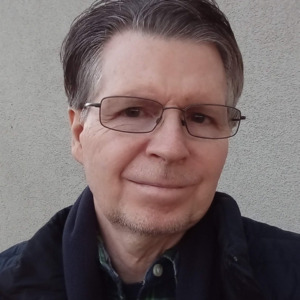
Tom Donahue is a seasoned talk host, an innovative and independent broadcast voice. Tom Donahue Show has returned and offered on-demand for podcasts and streaming. Heard on Talk Stream Live, Talk Right and K-Star Talk Radio Network. Was also aired on KCAA Radio, WFYL, Red State Talk Radio, Liberty News Radio. He was on broadcast radio distributed by Salem (SRN) in 2018 with a live weekend talk show aired on stations KSLM, KCAA, WXME, KYAH, Red State Talk Radio, Liberty News Radio, K-Star Talk Radio Network and TSL. Tom's podcasts made available on Podomatic and offered on most other digital and online podcast venues/outlets. He has produced many Tom Donahue Reports programs for free on-demand listens and downloads. He hails from Philadelphia, PA. Tom is an American original, a patriot pioneer who trailblazed the 1st America First themed talk show in the early 1990’s. He’s still a proud protectionist and constitutional crusader who opposes and exposes globalism and the new world order, the fed, big brother gov’t, media and corporate mega-monopoly corruption, cover-ups and conspiracies. Always authentic, independent minded, freedom fighting, liberty loving and truth seeking. Tom entered the ranks of talk radio as a man on a mission, driven more by his patriotic passions, agenda and noble causes, than for the lore of fame and fortune. Unlike many hosts, Tom’s firm beliefs, unwavering views and political ideals were well established. Tom is an investigative broadcaster whose mission is to seek truth, promote liberty and defend freedom. He is not beholden to the established political, corporate or media order, nor bound by its constraints. His show reaches beyond the political pale, covering the stories and championing the causes that matter most to him. Tom rationally and factually reports and gives his take on events without rushing to judgment. He shares what he knows rather than simply what he thinks. He relies on his keen wit, insight and intellect to inform, inspire and raise ones’ ire in the talk town square. Tom plans to cover the political, cultural, monetary, media and health sectors. He will offer greater insights and in-depth analysis of the most critical events and compelling issues confronting our nation. He is a non-denominational Christian and a cultural conservative who leans libertarian and his hero is Thomas Jefferson. In 2016, his talk show Philly Freedom aired on WFYL 1180 AM and streamed on Red State Talk Radio located in Philadelphia, PA. Prior, I hosted Tom Donahue Reports and TSL Talks 2009-2016. Previously, he streamed his talk show online via many web based online venues up to 2013, which also included KCAA radio. In the 1990s’ Tom hosted America’s Town Forum a nationally syndicated talk show broadcasted on Talk America Radio Network, BRN, Peoples Radio Network, and Sun Radio Networks. He began his talk radio career in 1990, Dallas Texas with a local weekly talk show. Later that year, he was offered a weekday afternoon talk host position with KID AM 590 in Idaho Falls, ID. April, 1991 Tom was selected for national syndication to replace Chuck Harder’s show on the Sun Radio Network weekday afternoons based in Clearwater, FL. Later that year, Tom joined Chuck Harder’s new network The Peoples Radio Network for the mid-mornings which included his flagship station 50k watt WPDQ 690 AM in Jacksonville, FL. He eventually landed with the Talk America Radio Network in Boston, MA. Tom returned with his talk show in recent times as a streaming show airing on many online stations and digital platforms and as a program podcast. His show also aired on KCAA and WFYL radio stations. Tom is the Program Director for Talk Stream Live. He earned his BA in Human and Mass Communications from Rutgers University.
more


 Share episode
Share podcast
Share episode
Share podcast




 MUSIC
MUSIC
 TALK
TALK